 Image 1 of 1
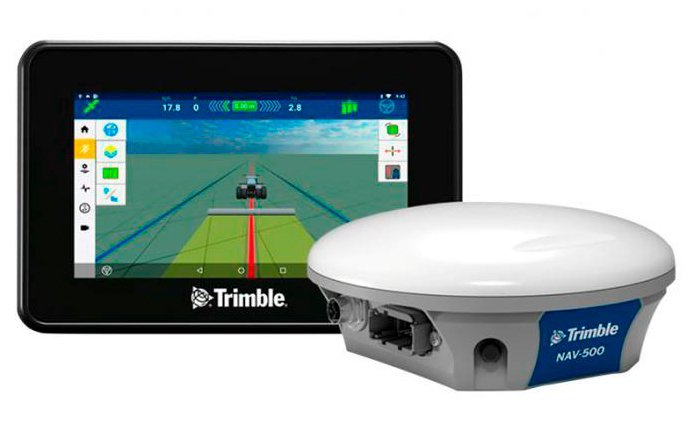
GFX-350 + NAV-500 Combo
GFX-350 Display Features
This unit was designed with a reduced user interface called Simple Mode – which allows you to become familiar with some of the basic elements of precision agriculture first. Once your comfort level increases, you can add more complex tasks. This approach also accommodates multiple types of users, so if you have a worker that’s not as familiar with the technology, he can simply switch to Simple Mode for primary GFX-350 use or even manually guide the tractor using the display.
At the same time, the GFX-350 offers all the features and functionality that experienced users are accustomed to as well, so it’s great for users who want to expand how they use it, including input, section control, and even ISO-mechanical control for a variety of different implements and tools. You can also upgrade the GFX-350 by adding a receiver or a Trimble steering solution. The built-in adaptability makes this an excellent choice for really customizing how you want to integrate the GFX-350 into your existing operation.
Out of the box, you’re essentially ready to roll with fast and easy installation and hookup, as well as a quick release if you want to transfer it between cabs. The GFX-350’s display is a little smaller than the other options in the Trimble lineup, but at 17.8 cm/7 inches, its compact size doesn’t take up a lot of room in the cab, which is a nice size for getting used to a display if this is new for you. Trimble’s Precision-IQˇ platform is easy to understand and control, and if you ever decide to upgrade, it’s the same platform used on all our displays. You can input information once and use it forever with this platform.
What equipment is the GFX-350 Display compatible with?
Often, when integrating precision agriculture for the first time, farmers are concerned about how it will interact with their existing equipment. This unit has you covered on all accounts. It’s backward compatible with older Trimble solutions like EZ-Steer, which is a great entry point for anyone beginning to integrate precision agriculture for the first time. It also offers ISOBUS connectivity to various implements, from balers to spreaders and everything in between.
The GFX-350 also comes standard with Bluetooth and WIFI, so the data you use and collect over time can be shared directly with your office. If you’re still making a connectivity transition, the unit also has one USB port for transferring data. Regardless of how you collect and analyze data, it’s a critical component that gives you accurate information about how well your operation is doing. Having a system that easily collects data gives you a broad picture of how your operation has done historically and helps in planning for the future.
The Trimble® NAV-500™ guidance controller pairs with all GFX series displays. It is especially suited to the GFX-350 display to create a professional level system at a price usually associated with the entry-level market. With the NAV-500 guidance controller, you get:
Compatibility with five (5) satellite constellations: GPS, GLONASS, BeiDou, QZSS, and Galileo
Sub-meter accuracy
Trimble ViewPoint RTX™ corrections (subscription required)
The NAV-500 guidance controller is easily upgraded with a range of licenses that can be purchased for additional features including:
Roll corrected manual guidance
EZ-Steer®
EZ-Pilot®
EZ-Pilot® Pro
Satellite Corrections
ViewPoint RTX™
SBAS (WAAS, EGNOS, GAGAN, MSAS)
SBAS +
GFX-350 Display Features
This unit was designed with a reduced user interface called Simple Mode – which allows you to become familiar with some of the basic elements of precision agriculture first. Once your comfort level increases, you can add more complex tasks. This approach also accommodates multiple types of users, so if you have a worker that’s not as familiar with the technology, he can simply switch to Simple Mode for primary GFX-350 use or even manually guide the tractor using the display.
At the same time, the GFX-350 offers all the features and functionality that experienced users are accustomed to as well, so it’s great for users who want to expand how they use it, including input, section control, and even ISO-mechanical control for a variety of different implements and tools. You can also upgrade the GFX-350 by adding a receiver or a Trimble steering solution. The built-in adaptability makes this an excellent choice for really customizing how you want to integrate the GFX-350 into your existing operation.
Out of the box, you’re essentially ready to roll with fast and easy installation and hookup, as well as a quick release if you want to transfer it between cabs. The GFX-350’s display is a little smaller than the other options in the Trimble lineup, but at 17.8 cm/7 inches, its compact size doesn’t take up a lot of room in the cab, which is a nice size for getting used to a display if this is new for you. Trimble’s Precision-IQˇ platform is easy to understand and control, and if you ever decide to upgrade, it’s the same platform used on all our displays. You can input information once and use it forever with this platform.
What equipment is the GFX-350 Display compatible with?
Often, when integrating precision agriculture for the first time, farmers are concerned about how it will interact with their existing equipment. This unit has you covered on all accounts. It’s backward compatible with older Trimble solutions like EZ-Steer, which is a great entry point for anyone beginning to integrate precision agriculture for the first time. It also offers ISOBUS connectivity to various implements, from balers to spreaders and everything in between.
The GFX-350 also comes standard with Bluetooth and WIFI, so the data you use and collect over time can be shared directly with your office. If you’re still making a connectivity transition, the unit also has one USB port for transferring data. Regardless of how you collect and analyze data, it’s a critical component that gives you accurate information about how well your operation is doing. Having a system that easily collects data gives you a broad picture of how your operation has done historically and helps in planning for the future.
The Trimble® NAV-500™ guidance controller pairs with all GFX series displays. It is especially suited to the GFX-350 display to create a professional level system at a price usually associated with the entry-level market. With the NAV-500 guidance controller, you get:
Compatibility with five (5) satellite constellations: GPS, GLONASS, BeiDou, QZSS, and Galileo
Sub-meter accuracy
Trimble ViewPoint RTX™ corrections (subscription required)
The NAV-500 guidance controller is easily upgraded with a range of licenses that can be purchased for additional features including:
Roll corrected manual guidance
EZ-Steer®
EZ-Pilot®
EZ-Pilot® Pro
Satellite Corrections
ViewPoint RTX™
SBAS (WAAS, EGNOS, GAGAN, MSAS)
SBAS +